Print styles
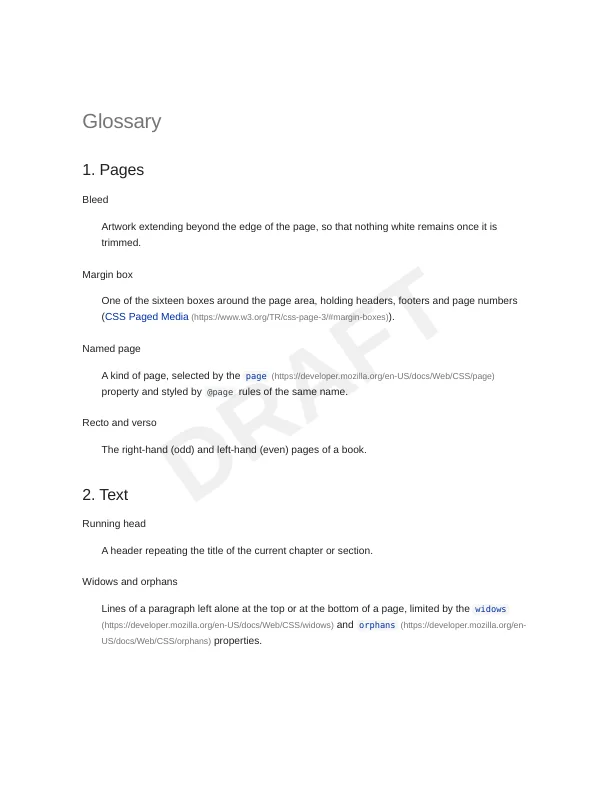
Number headings, print the address of links, mark every page as a draft, and keep content for the website or for documents only.
site_url: https://field-guide.example.com/

plugins:
  - exporter:
      formats:
        pdf:
          stylesheets:
            - pdf.css
/* Number second and third-level headings */
.md-typeset {
  counter-reset: h2;

  h2 {
    counter-reset: h3;
  }

  h2::before {
    counter-increment: h2;
    content: counter(h2) ". ";
  }

  h3::before {
    counter-increment: h3;
    content: counter(h2) "." counter(h3) ". ";
  }
}

/* Print the address of links to other websites */
.md-typeset a[href^="http"]::after {
  content: " (" attr(href) ")";
  color: #757575;
  font-size: 0.85em;
  overflow-wrap: anywhere;
}

/* Mark every page as a draft */
body::after {
  content: "DRAFT";
  position: fixed;
  top: 40%;
  left: 0;
  right: 0;
  color: rgb(0 0 0 / 6%);
  font: 700 96pt sans-serif;
  text-align: center;
  transform: rotate(-35deg);
}
<div class="mkdocs-exporter-ignore" markdown>

!!! tip "Download"

    The documents are generated along with the website...

</div>

This document was printed from the Field Guide website.
{ .mkdocs-exporter-only }
- Stylesheets of the plugin only apply to documents: the website keeps its own styles.
- CSS counters number headings;
counter-resetrestarts the numbering of third-level headings at each second-level heading. attr(href)prints the address of links after them. Links to other pages point to the website (site_url), so their address is printed too: add:not([href^="https://field-guide.example.com"])to the selector to only print the address of other websites. In books, links between pages point within the book, without an address. Withoutsite_url(norformats.pdf.url), links to other pages are temporarily given a placeholder address,https://mkdocs-exporter.invalid/...: exclude it too.- A
position: fixedelement of the body (a child or a pseudo-element ofbody, herebody::after) is printed on every page, at the same place. Fixed elements inside the page's content are only printed on its first page. - Elements of the
mkdocs-exporter-ignoreclass are left out of documents, while those of themkdocs-exporter-onlyclass are left out of the website (here, a paragraph given the class with theattr_listextension).