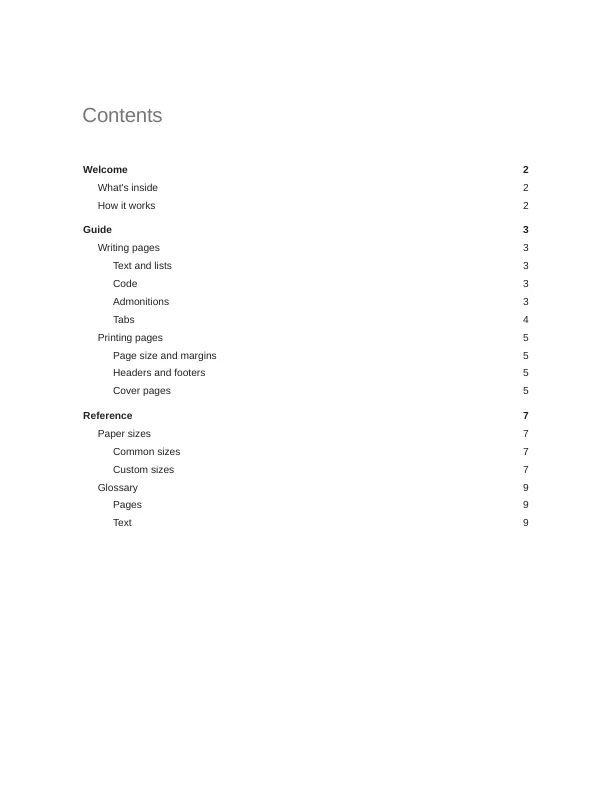
Tables of contents
Documents can start with a table of contents, with page numbers: the document of each page lists its headings, and a book lists its pages and their headings. The page numbers are filled from a first print of the document, which is then printed again.
Documents of pages
The table of contents of the page's headings is inserted after the front cover:
plugins:
  - exporter:
      formats:
        pdf:
          toc:
            enabled: true
            title: Contents # "Table of contents" by default
            depth: 3 # Second and third-level headings
Pages without headings besides their title don't get one, nor do books, which have a table of contents of their own. A page can do without one, or have one while the option is disabled, in its front matter:
---
exporter:
  pdf:
    toc:
      enabled: false
---
Books
The table of contents of a book lists its pages, following the navigation, and their headings. It is inserted after the first front cover (books is under formats.pdf):
books:
  - output: documentation.pdf
    toc:
      enabled: true
      title: Contents # "Table of contents" by default
      depth: 2 # Pages and their second-level headings
Appearance
The appearance of tables of contents can be changed with CSS (.mkdocs-exporter-toc and the classes of the default template), or replaced with a Jinja template of your own (toc.template of the documents of pages or of a book, relative to mkdocs.yml). Templates receive the title and the entries of the table of contents, each entry having a title, a page number, an href and children: navigation sections, then pages, then their headings. For instance, a table of contents laid out as a table:
plugins:
  - exporter:
      formats:
        pdf:
          stylesheets:
            - pdf.css
          books:
            - output: field-guide.pdf
              toc:
                enabled: true
                title: Contents
                template: toc.html.j2
<h1>{{ title }}</h1>
<table class="contents">
  {%- for entry in entries recursive %}
  <tr class="level-{{ loop.depth }}">
    <td><a href="{{ entry.href }}">{{ entry.title }}</a></td>
    <td>{{ entry.page }}</td>
  </tr>
  {{- loop(entry.children) }}
  {%- endfor %}
</table>
.contents {
  width: 100%;

  a {
    color: inherit;
  }

  td:last-child {
    text-align: right;
  }

  .level-1 td {
    padding-top: 0.8em;
    font-weight: bold;
  }

  .level-2 td:first-child {
    padding-left: 1.5em;
  }

  .level-3 td:first-child {
    padding-left: 3em;
  }
}