Cover pages
Cover pages are added at the beginning (front) and at the end (back) of documents. They are Jinja templates rendering HTML, with styles of their own:
plugins:
  - exporter:
      formats:
        pdf:
          covers:
            front: covers/front.html.j2
            back: covers/back.html.j2
<style data-mkdocs-exporter-teleport="head">
  @page :first {
    margin: 0;
  }

  .manual {
    break-after: page;
    padding: 2cm 2cm 0;
    color: #1a1a1a;
    font-family: "DejaVu Sans Mono", Menlo, Consolas, monospace;
    font-size: 9.5pt;
    line-height: 1.6;

    .header {
      display: flex;
      justify-content: space-between;
      padding-bottom: 0.2cm;
      border-bottom: 1px solid;
      font-size: 8.5pt;
    }

    .name {
      margin: 5cm 0 1.2cm;
      font-size: 36pt;
      line-height: 1.1;
      letter-spacing: -0.03em;

      /* A cursor after the name */
      &::after {
        content: "";
        display: inline-block;
        width: 0.5em;
        height: 0.85em;
        margin-left: 0.1em;
        vertical-align: -0.1em;
        background: #002fa7;
      }
    }

    .label {
      margin-top: 0.6cm;
      color: #002fa7;
      font-weight: 700;
    }

    .text {
      padding-left: 4ch;
    }

    .number {
      color: #9e9e9e;
    }
  }
</style>
{% set home = page.is_homepage %}
{% set name = (config.site_name if home else page.title) | lower | replace(" ", "-") %}
{% set toc = page.toc | list %}
{% set sections = toc[0].children if toc and toc[0].level == 1 else toc %}
{% set related = (page.parent.children | rejectattr("url", "equalto", page.url) | list) if page.parent else [] %}
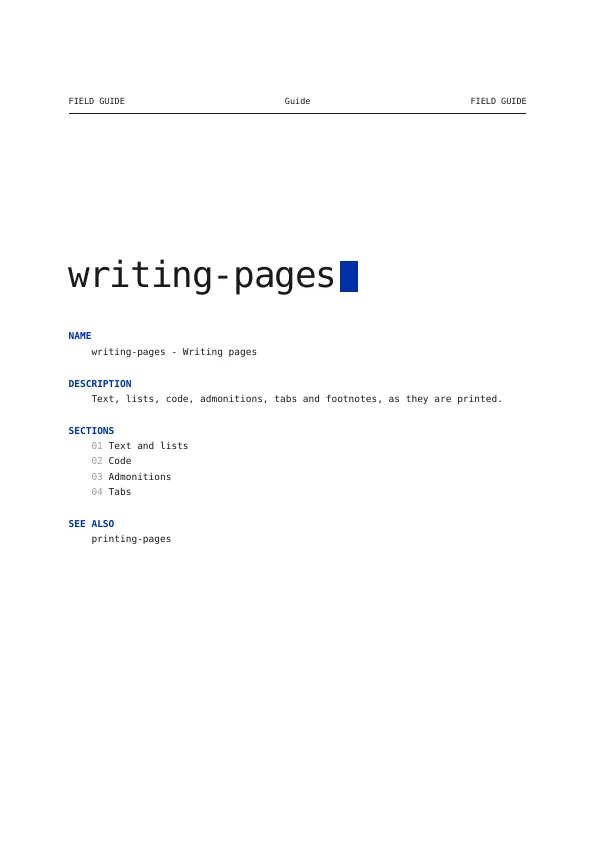
<div class="manual">
  <div class="header">
    <span>{{ config.site_name | upper }}</span>
    <span>{{ page.parent.title if page.parent else config.site_author }}</span>
    <span>{{ config.site_name | upper }}</span>
  </div>
  <div class="name">{{ name }}</div>
  <div class="label">NAME</div>
  <div class="text">{{ name }} - {{ config.site_name if home else page.title }}</div>
  <div class="label">DESCRIPTION</div>
  <div class="text">{{ config.site_description if home else page.meta.description }}</div>
  {% if sections %}
  <div class="label">SECTIONS</div>
  <div class="text">
    {% for section in sections %}
    <div><span class="number">{{ "%02d" | format(loop.index) }}</span> {{ section.title }}</div>
    {% endfor %}
  </div>
  {% endif %}
  {% if related %}
  <div class="label">SEE ALSO</div>
  <div class="text">
    {% for other in related %}{{ other.title | lower | replace(" ", "-") }}{{ ", " if not loop.last }}{% endfor %}
  </div>
  {% endif %}
</div>
<style data-mkdocs-exporter-teleport="head">
  /* A page of its own, without the header and the footer */
  @page colophon {
    @top-left {
      content: none;
    }

    @top-right {
      content: none;
    }

    @bottom-center {
      content: none;
    }
  }

  .colophon {
    page: colophon;
    padding-top: 18cm;
    color: #1a1a1a;
    font-family: "DejaVu Sans Mono", Menlo, Consolas, monospace;
    font-size: 9pt;
    line-height: 1.6;

    .label {
      color: #002fa7;
      font-weight: 700;
    }

    .text {
      max-width: 13cm;
      padding-left: 4ch;
    }
  }
</style>
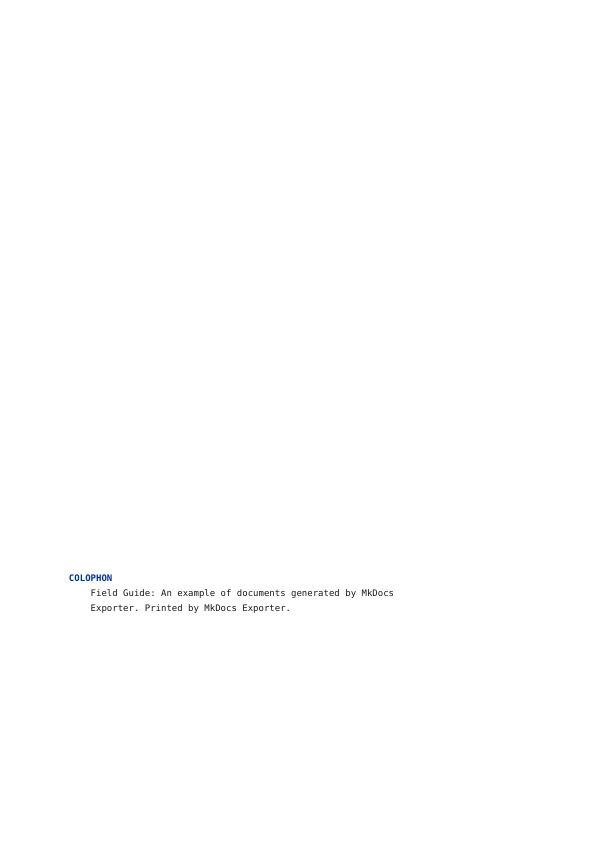
<div class="colophon">
  <div class="label">COLOPHON</div>
  <div class="text">
    {{ config.site_name }}: {{ config.site_description }}
    Printed by MkDocs Exporter.
  </div>
</div>
These covers are those of the Field Guide example, and the Cover pages example shows another one.
Templates have access to:
| Variable | Value | For instance |
|---|---|---|
page | The page | {{ page.title }}, {{ page.url }}, {{ page.parent.title }} (its section), {{ page.is_homepage }}, page.toc (its headings) |
page.meta | The page's metadata (front matter) | {{ page.meta.description }} |
config | The MkDocs configuration | {{ config.site_name }}, {{ config.site_author }} |
extra | The extra section of the configuration | {{ extra.version }} |
The page's metadata are also available as variables (e.g. {{ description }}). When the macros plugin is enabled, templates are rendered with its environment: its variables (such as navigation, every page of the website), macros and filters are available too.
- Covers are inserted in the flow of the document, wrapped in
.mkdocs-exporter-front-coverand.mkdocs-exporter-back-cover: end the front cover with a page break (break-after: pageon its outer element, as in the examples), and start the back cover with one (break-before: page), unless headers or footers are configured (the back cover is then on a page of its own). <style data-mkdocs-exporter-teleport="head">moves styles to the document's head, where they take precedence over your stylesheets:@page :firstrules style the front cover's page (e.g. without margins, with a background).- Paths starting with
/(like/assets/images/logo.png) are resolved from the root of the website. - Headers and footers aren't printed on cover pages. A cover can use a named page of its own (e.g.
page: colophon, styled with@page colophon): headers and footers are printed there unless you empty its margin boxes (content: none), as the Field Guide's back cover does. - Decorations drawn in the background of the cover's page stay in place, whatever the space the theme leaves above the content: prefer them to elements as tall as the page, which may overflow onto a blank page.
Per-page cover pages
Pages can override cover pages in their front matter (paths are relative to mkdocs.yml):
---
exporter:
  pdf:
    covers:
      front: resources/templates/covers/special.html.j2
---
Hiding cover pages
Pages can also opt out of cover pages:
---
exporter:
  pdf:
    covers:
      enabled: false
---